Hyundai Tucson: Differential Carrier Assembly- Installation
Hyundai Tucson - Fourth generation (NX4) - (2020-2023) - Workshop Manual / Driveshaft and axle / Differential Carrier Assembly / Differential Carrier Assembly- Installation
Installation
- Install the differential carrier bracket (A).
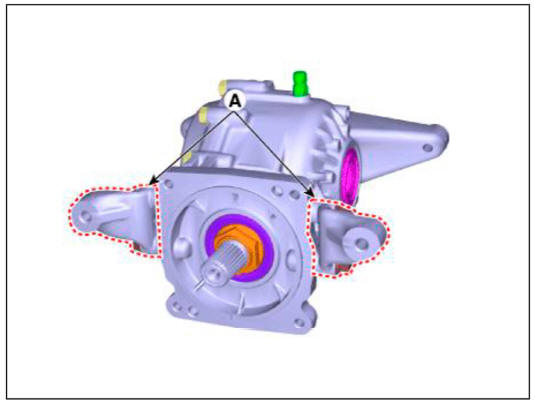
- Install the jack and intall the differential carrier assembly (A).
Tightening torque : 68.6 - 88.3 N m (7.0 - 9.0 kgf m , 50.6 - 65.1 lb ft)
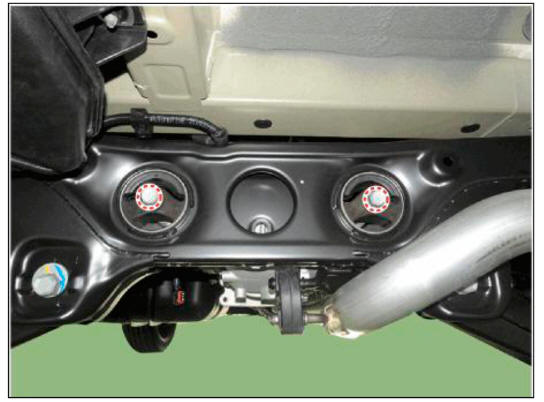
- Install the coupling assembly.
(Refer to All Wheel Drive (AWD) System - "Direct Electro Hydraulic Actuator Coupling")
- Install the propeller shaft.
(Refer to Propeller Shaft Assembly - "Propeller Shaft")
- Install the rear driveshaft.
(Refer to Rear Driveshaft Assembly - "Rear Driveshaft")
- Connect the (-) batteiy terminal.
- Check the rear alignment.
(Refer to Suspension System - "Alingment")
READ NEXT:
 General Information
Troubleshooting
Wheel and tire diagnosis
Rapid wear at the center
Center-tread down to fabric due to
excessive over inflated tires
Lack of rotation
Excessive toe on drive wheels
Heavy acceleration on drive
Rapid wear at both sh
Front Suspension System
Components Location
Front sub frame
Steering gear box
Front stabilizer bar
Front lower arm
Front knuckle assembly
Components
Stmt assembly
Spring lower pad
Dust cover
Coil spring
Spring upper pad
Bumper rubber
I
SEE MORE:
Front Radar System - Description and operation
WARNING
The System may be limited when
The radar sensor or camera is blocked with a foreign object or
debris.
The camera lens is contaminated due to tinted filmed or coated
windshield, damaged glass, or smck of foreign matter
(sticker,
Additional seat belt safety
precautions
Seat belt use during pregnancy
The seat belt should always be used
during pregnancy. The best way to
protect your unborn child is to protect
yourself by always wearing the seat belt.
Pregnant women should always wear
a lap-shoulder seat belt.
Information
- Home
- Hyundai Tucson - Fourth generation (NX4) - (2020-2023) - Owner's Manual
- Hyundai Tucson - Fourth generation (NX4) - (2020-2023) - Workshop Manual
