Hyundai Tucson: Multifunction Switch - Components
Hyundai Tucson - Fourth generation (NX4) - (2020-2023) - Workshop Manual / Body Electrical System / Multifunction Switch / Multifunction Switch - Components
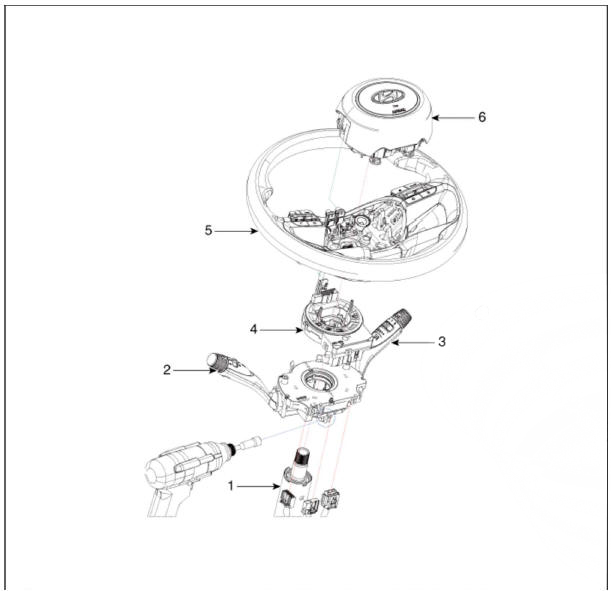
- Steering column
- Lighting swtich
- Wiper switch
- Clock spring
- Steering wheel
- Driver airbag (DAB)
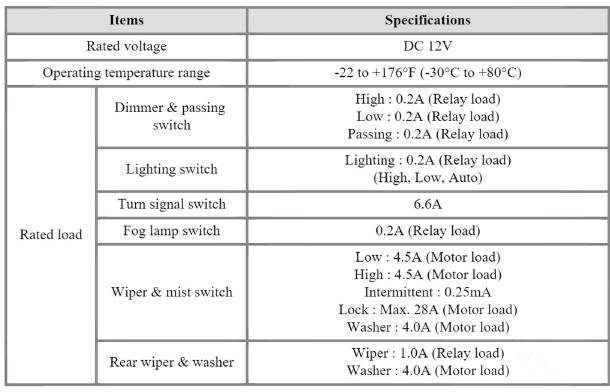
Specifications
Removal
- Disconnect the negative (-) battery terminal.
- Remove the clock spring.
(Refer to Restraint - "Driver Airbag(DAB) and Clock Spring")
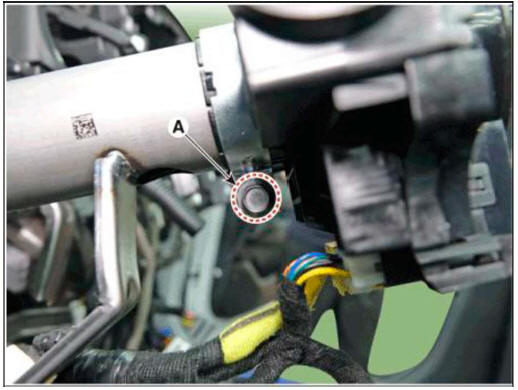
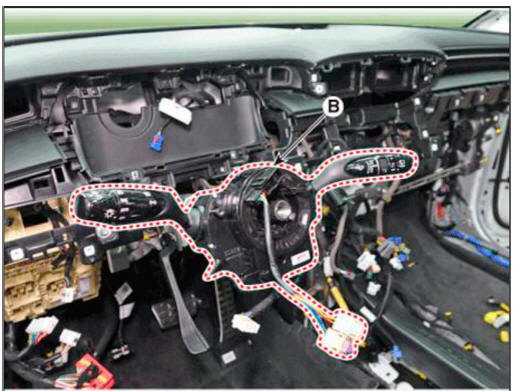
- Disconnect multifunction switch assembly connector (A).

- Remove the multifunction switch assembly (B) after loosening the clamp (A).
Installation
- Install the multifunction switch assembly.
- Install the steering column upper and lower shrouds.
- Install the steering wheel.
- Connect the negative (-) battery terminal.
Inspection
READ NEXT:
 Multifunction Switch Inspection
Check for continuity between the terminals in each switch position as
shown below.
Inspection (With Diagnostic Tool)
In the body electrical system, failure can be quickly diagnosed by using
the vehicle diagnostic system (d
Horn
Component Location
Horn switch
Horn relay
Horn (Low pitch)
Horn (High pitch)
Clock spring
Removal
Remove the front bumper assembly.
(Refer to Body - "Front Bumper Assembly")
Remove the bolts and disconnect the h
AVN System
Description
AVN system
The AVN system has improved information search and easiness of manipulation
for the driver by
simplifying the system operation experience and unifying the display of the user
information such as
multimedia and car infor
SEE MORE:
Forward Collision-Avoidance Assist Operation
Basic function
Warning and control
The basic function for Forward Collision-
Avoidance Assist is to help warn and
control the vehicle depending on the
collision risk level : 'Collision Warning',
'Emergency Braking' and 'Stopping
vehicle and en
Lane Keeping Assist Settings
Setting features
Lane Safety
With the engine on, select 'Driver
Assistance → Lane Safety' from the
Settings menu to set whether or not to
use each function.
If 'Assist' is selected, Lane Keeping
Assist will automatically assist th
Information
- Home
- Hyundai Tucson - Fourth generation (NX4) - (2020-2023) - Owner's Manual
- Hyundai Tucson - Fourth generation (NX4) - (2020-2023) - Workshop Manual
