Hyundai Tucson: Trip computer (Type A)
The trip computer is a microcomputercontrolled driver information system that displays information related to driving.
Information
Some driving information stored in the trip computer (for example Average Vehicle Speed) resets if the battery is disconnected.
Trip modes
Drive Info
- Trip distance
- Average Fuel Economy
- Instant Fuel Economy
Since refueling
- Trip distance
- Average Fuel Economy
- Instant Fuel Economy
Accumulated Info
- Trip distance
- Average Fuel Economy
- Instant Fuel Economy
Auto Stop (if equipped)
Digital speedometer
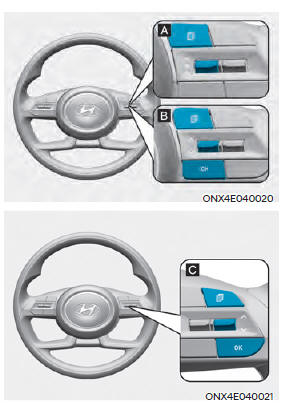
To change the trip mode, toggle the
"
 " switch on the steering wheel
- Manual reset
To clear the average fuel economy manually, press the OK switch on the steering wheel for more than 1 second when the Average Fuel Economy is displayed.
- Automatic reset
To automatically reset the average fuel economy, select between 'After Ignition' or 'After Refueling' from the Settings menu in the instrument cluster
- After Ignition: When the engine has been OFF for 3 minutes or longer the average fuel economy will reset automatically.
- After Refueling: The average fuel economy will reset automatically after adding 6 liters (1.6 gallons) of fuel or more and after driving speed exceeds 1 mph (1 km/h)
*For 10.25-inch instrument cluster, you can check the fuel economy in the center bottom of the cluster.
Drive info
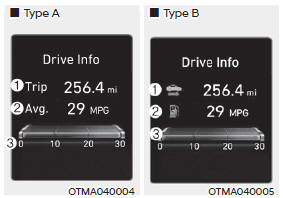
Trip distance (1), average fuel economy (2), and instant fuel economy (3) are displayed.
The information is combined for each ignition cycle. However, when the engine has been OFF for 3 minutes or longer the Drive Info screen will reset.
To reset manually, press the OK switch on the steering wheel for more than 1 second when 'Drive Info' is displayed.
Since refuel(l)ing
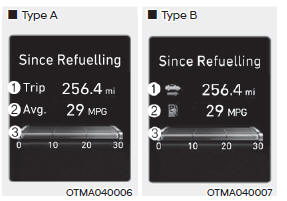
Trip distance (1), average fuel economy (2), and instant fuel economy (3) after the vehicle has been refueled are displayed.
To reset manually, press the OK switch on the steering wheel for more than 1 second when 'Since Refueling' is displayed.
Accumulated info
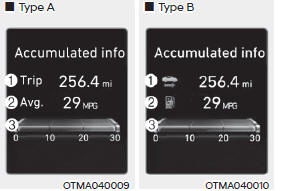
Accumulated trip distance (1), average fuel economy (2), and instant fuel economy (3) are displayed.
The information is accumulated starting from the last reset.
To reset manually, press the OK switch on the steering wheel for more than 1 second when 'Accumulated Info' is displayed.
Auto stop (if equipped)
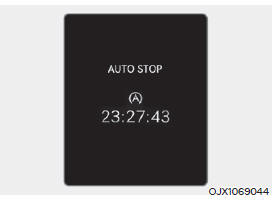
AUTO STOP display shows the elapsed time of engine stop by Idle Stop and Go system.
For more details, refer to "Idle Stop and Go (ISG)" section in chapter 6.
Digital speedometer
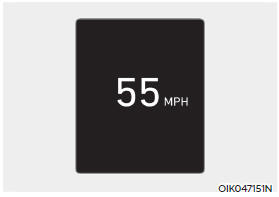
Digital speedometer display shows the speed of the vehicle
READ NEXT:
 Trip computer (Type B)
The trip computer is a microcomputercontrolled
driver information system that
displays information related to driving.
Information
Some driving information stored in the
trip computer (for example Average
Vehicle Speed) resets if the battery is
Vehicle settings (infotainment system)
Vehicle Settings in the infotainment
system provides user options for a
variety of settings including door lock/
unlock features, convenience features,
driver assistance settings, etc.
Vehicle Settings menu
Driver Assistance
Clus
SEE MORE:
Differential Carrier Assembly- Installation
Installation
Install the differential carrier bracket (A).
Install the jack and intall the differential carrier assembly (A).
Tightening torque :
68.6 - 88.3 N m (7.0 - 9.0 kgf m , 50.6 - 65.1 lb ft)
Install the coupling ass
Downhill Brake Control (DBC)
Downhill Brake Control assists the driver
to descend down a steep hill without
having to depress the brake pedal.
The system automatically applies the
brakes to maintain vehicle speed below
a certain speed and allows the driver
to concent
Information
- Home
- Hyundai Tucson - Fourth generation (NX4) - (2020-2023) - Owner's Manual
- Hyundai Tucson - Fourth generation (NX4) - (2020-2023) - Workshop Manual
