Hyundai Tucson: Instrument cluster control
4.2-inch

„10.25-inch
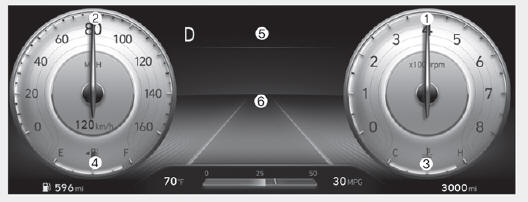
The actual cluster in the vehicle may differ from the illustration.
For more information, refer to "Gauges and meters" section in this chapter.
- Tachometer
- Speedometer
- Engine coolant temperature gauge
- Fuel gauge
- Warning and indicator lights
- LCD display
Instrument panel illumination
When the vehicle's parking lights or headlamps are on, press the illumination control switch to adjust the brightness of the instrument panel illumination.
When pressing the illumination control switch, the interior switch illumination intensity also adjusted.
You can adjust the brightness of the instrument panel illumination from the User Settings Mode on the LCD display when the ignition switch is on ('Lights → Illumination'). When the vehicle's parking lights or headlamps are on, interior switch illumination intensity and mood lamps are also adjusted.
If your vehicle is equipped with additional navigation, please refer to the infotainment system manual separately supplied.
WARNING
Never adjust the instrument cluster while driving. This could result in loss of control and lead to an accident that may cause vehicle damage, or lead to serious injury or death.
- The brightness of the instrument panel illumination is displayed.
- When the brightness setting reaches either the minimum or maximum level, a chime will sound.
- Gauges and meters
- Warning and indicator lights
- LCD Display Messages for Vehicles Equipped with Smart Key
READ NEXT:
 Gauges and meters
Speedometer
The speedometer indicates the speed of
the vehicle and is calibrated in miles per
hour (MPH) and/or kilometers per hour
(km/h).
Tachometer
The tachometer indicates the
approximate number of engine
revolutions per minute (R
Warning and indicator lights
Information
Make sure that all warning lights are OFF
after starting the engine. If any light is still
ON, this indicates a situation that needs
attention.
Seat belt warning light
This warning light informs the driver that
the seat belt is
LCD Display Messages for Vehicles Equipped with Smart Key
Shift to P
This message is displayed if you try to
turn off the vehicle without the gear in
the P (Park) position.
If this occurs, the Engine Start/Stop
button turns to the ACC position.
Low key battery
When the Engine Start/Stop button
is
SEE MORE:
Inhibitor switch/ Manual control lever
Components
Inhibitor switch
Manual control lever
Fault Diagnosis
Fault Diagnosis for Symptom
Specifications
Signal Code Table
Inspection
WARNING
Thoroughly check connectors for looseness, poor connection, bending,
cor
Transfer Assembly- Removal
Removal
A Type
Remove the engine room under cover.
(Refer to Engine Mechanical System - "Engine Room Under Cover")
Remove the front driveshaft assembly. Right side
(Refer to Driveshaft and Axle - "Front Driveshaft")
Information
- Home
- Hyundai Tucson - Fourth generation (NX4) - (2020-2023) - Owner's Manual
- Hyundai Tucson - Fourth generation (NX4) - (2020-2023) - Workshop Manual
